

sales@rebelgaming.co.za
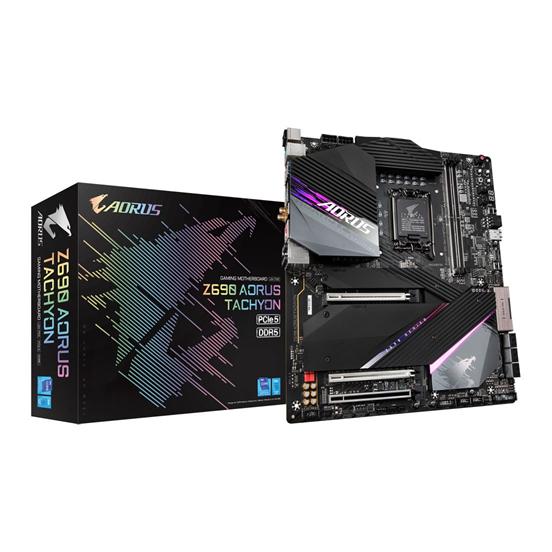
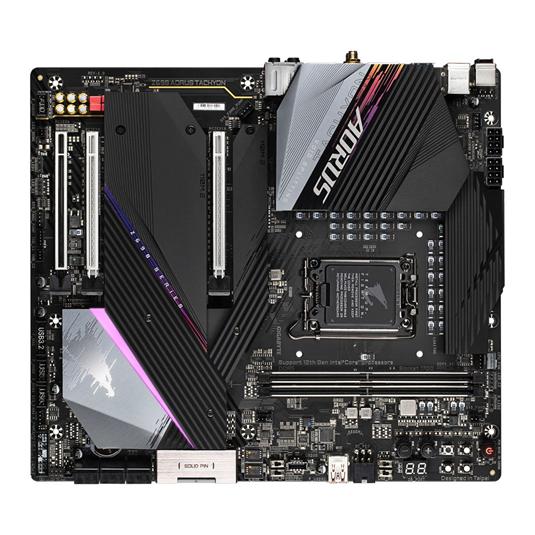
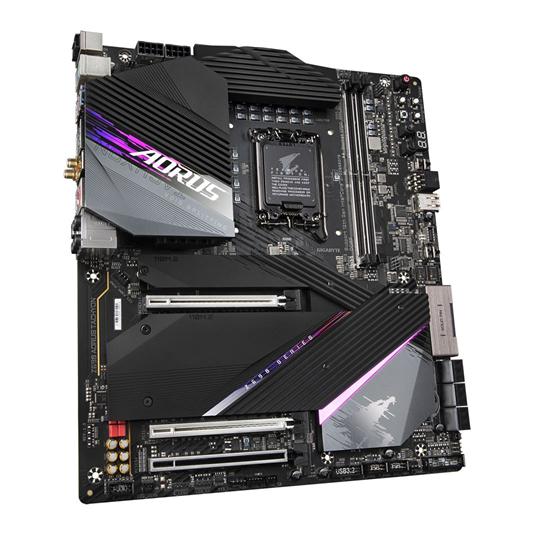
R18111.00 Incl. Vat
(Displayed price above applies to EFT / Bank Transfer payments only.)
Out of stock
KEY FEATURES:
– E-ATX Form Factor
– Intel Z690 Chipset
– Socket LGA1700
– 2x DDR5 DIMM Slots, Supports Up to 64GB
– Supports Up to DDR4-7000
– 1x PCI-E x16, 1x PCI-E 5.0 x16, 1x PCI-E 3.0 x16 Slots
– 6x SATA 6Gb/s Ports, 1x M.2 Slots
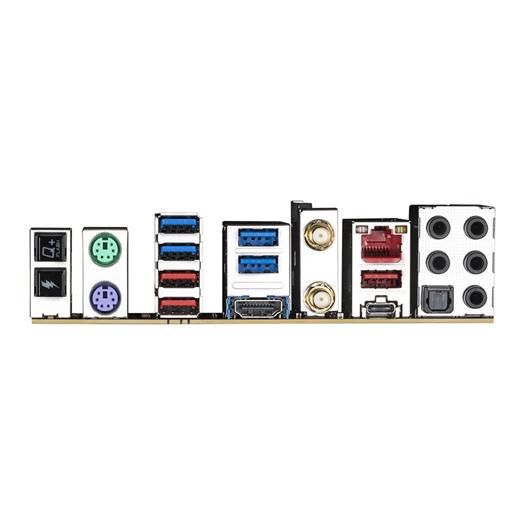
– 1x USB Type-C, with USB 3.2 Gen 2×2 Support
– 3x USB 3.2 Gen 2 Type-A, 4x USB 3.2 Gen 1
– 1x HDMI, 5x Audio Jacks
– Intel Wi-Fi 6E AX210
– Intel 2.5GbE LAN Chip
– Realtek ALC1220-VB Codec
– 3 Year Warranty
Intel Z690 Chipset
LGA 1700 CPU Socket
12th Gen Intel Compatible Processors
E-ATX Form Factor
2. RESET BUTTON
Reboot system.
3. LIMP MODE
Allows the system to automatically reboot with default or safe settings without having to clear CMOS settings first. This is useful in situations when users fail to boot up the system with their self-defined memory parameters.
4. COLD RESET BUTTON
Use this button to force your system to reboot. This is usually used if a CPU crash or memory errors occur or warm reset doesn’t work when tuning your system settings. Hitting this button to force the system to shutdown and boot again.
5. CLEAR CMOS
Clear BIOS setting.
6. CPU RATIO SWITCH
Raise or lower CPU ratio manually.
7. VOLTAGE MEASUREMENT
Use multimeter to contact those points to measure different voltage value.
8. OC TRIGGER SWITCH
This switch can be used to lower the CPU frequency to cool down the CPU temperature before running a benchmark without having to change any software settings. Instantly setting the TGR switch back to its default position when the benchmark begins will revert the CPU frequency to the original value.
9. ENHANCED LN2 MODE
Dependent on the LN2 Mode Switch setting (unavailable if LN2_SW is set to 1). Enabling this switch will allow the CPU to boot up at a temperature as low as possible.
10. SB SWITCH
The SB switch allows enabling or disabling of the Dual BIOS function.
11. BIOS SWITCH
The BIOS switch (BIOS_SW) allows users to easily select a different BIOS for boot up or overclocking, helping to reduce BIOS failure during overclocking
| SPECIFICATIONS | |
| Brand | Gigabyte |
| Series | AORUS |
| Model | Z690 AORUS TACHYON (rev. 1.0) |
| CPU | LGA1700 Socket: Support for 12th Generation Intel Core i9 Processors/Intel Core i7 Processors/Intel Core i5 Processors |
| L3 Cache Varies with CPU | |
| Chipset | Intel Z690 Express Chipset |
| Memory | Support for DDR5 7000(O.C.) / 6600(O.C.) / 6400(O.C.) / 6200(O.C.) / 6000(O.C.) / 5800(O.C.) / 5600(O.C.) / 5400(O.C.) / 5200(O.C.) / 4800 / 4000 MHz Memory Modules |
| 2x DDR5 DIMM Sockets Supporting Up to 64 GB (32 GB Single DIMM Capacity) of System Memory | |
| Dual Channel Memory Architecture | |
| Support for ECC Un-Buffered DIMM 1Rx8/2Rx8 Memory Modules (Operate in Non-ECC Mode) | |
| Support for Non-ECC Un-Buffered DIMM 1Rx8/2Rx8/1Rx16 Memory Modules | |
| Support for Extreme Memory Profile (XMP) Memory Modules | |
| Onboard Graphics | Integrated Graphics Processor-Intel HD Graphics Support: |
| 1x HDMI Port, Supporting a Maximum Resolution of 4096×2160@60 Hz *1, *2 | |
| (Graphics specifications may vary depending on CPU support.) | |
| Audio | Realtek ALC1220-VB CODEC *3 |
| Support for DTS:X Ultra | |
| High Definition Audio | |
| 2/4/5.1/7.1-Channel | |
| Support for S/PDIF Out | |
| LAN | Intel 2.5GbE LAN Chip (2.5 Gbps/1 Gbps/100 Mbps) |
| Wireless Communication Module | Intel Wi-Fi 6E AX210 |
| WIFI a, b, g, n, ac, ax, Supporting 2.4/5/6 GHz Carrier Frequency Bands | |
| BLUETOOTH 5.2 | |
| Support for 11ax 160MHz Wireless Standard and Up to 2.4 Gbps Data Rate *4 | |
| Expansion Slots | 1x PCI Express x16 Slot, Running at x16 (PCIEX16) *5 |
| 1x PCI Express x16 Slot, Running at x8 (PCIEX8) *6 | |
| (The PCIEX16 and PCIEX8 slots conform to PCI Express 5.0 standard.) | |
| 1x PCI Express x16 Slot, Running at x4 (PCIEX4) | |
| (The PCIEX4 slot conforms to PCI Express 3.0 standard.) | |
| Multi-Graphics Technology | Support for AMD Quad-GPU CrossFire and 2-Way AMD CrossFire Technologies |
| Storage Interface | CPU: |
| 1x M.2 Connector (Socket 3, M Key, Type 2260/2280/22110 PCIe 4.0 x4/x2 SSD Support) (M2A_CPU) | |
| Chipset: | |
| 2x M.2 Connectors (Socket 3, M Key, Type 2260/2280/22110 PCIe 4.0 x4/x2 SSD Support) (M2P_SB, M2Q_SB) | |
| 1x M.2 Connector (Socket 3, M Key, Type 2260/2280/22110 SATA and PCIe 4.0 x4/x2 SSD Support) (M2M_SB) | |
| 6x SATA 6Gb/s Connectors | |
| Support for RAID 0, RAID 1, RAID 5, and RAID 10 | |
| Intel Optane Memory Ready *7 | |
| USB | Chipset: |
| 2x USB Type-C Ports, with USB 3.2 Gen 2×2 Support (1 Port on the Back Panel, 1 Port Available Through the Internal USB Header) | |
| 3x USB 3.2 Gen 2 Type-A Ports (Red) on the Back Panel | |
| 2x USB 3.2 Gen 1 Ports Available Through the Internal USB Header | |
| ASMedia USB 3.2 Gen 2 Controller: | |
| 1x USB 3.2 Gen 2 Type-A Port (Red) Onboard | |
| Chipset+USB 3.2 Gen 1 Hub: | |
| 4x USB 3.2 Gen 1 Ports on the Back Panel | |
| Chipset+USB 2.0 Hub: | |
| 4x USB 2.0/1.1 Ports Available Through the Internal USB Headers | |
| Internal I/O Connectors | 1x 24-pin ATX Main Power Connector |
| 2x 8-pin ATX 12V Power Connectors | |
| 1x 6-pin OC_PEG Power Connector | |
| 1x CPU Fan Header | |
| 1x Water Cooling CPU Fan Header | |
| 4x System Fan Headers | |
| 2x System Fan/Water Cooling Pump Headers | |
| 2x Addressable LED Strip Headers | |
| 2x RGB LED Strip Headers | |
| 4x M.2 Socket 3 Connectors | |
| 6x SATA 6Gb/s Connectors | |
| 1x Front Panel Header | |
| 1x Front Panel Audio Header | |
| 1x USB Type-C Header, with USB 3.2 Gen 2×2 Support | |
| 1x USB 3.2 Gen 2 Type-A Port (Red) | |
| 1x USB 3.2 Gen 1 Header | |
| 2x USB 2.0/1.1 Headers | |
| 1x Noise Detection Header | |
| 2x Thunderbolt Add-In Card Connectors | |
| 2x Temperature Sensor Headers | |
| Voltage Measurement Points | |
| 1x Clear CMOS Jumper | |
| 1x Power Button (PW_SW) | |
| 1x Reset Button (RST_SW) | |
| 1x Clear CMOS Button (CMOS_SW) | |
| 1x Cold Reset Button (RTY_SW) | |
| 1x Protection Mode Button (LIMP_MODE) | |
| 2x BIOS Switches (BIOS_SW/SB) | |
| 1x CPU Ratio Up Button (RATIO_UP) | |
| 1x CPU Ratio Down Button (RATIO_DW) | |
| 1x OC Trigger Switch (TGR) | |
| 1x Reserved Switch (RSV_SW) | |
| Back Panel Connectors | 1x Q-Flash Plus Button |
| 1x OC Ignition Button | |
| 1x PS/2 Keyboard Port | |
| 1x PS/2 Mouse Port | |
| 2x SMA Antenna Connectors (2T2R) | |
| 1x HDMI Port | |
| 1x USB Type-C Port, with USB 3.2 Gen 2×2 Support | |
| 3x USB 3.2 Gen 2 Type-A Ports (Red) | |
| 4x USB 3.2 Gen 1 Ports | |
| 1x RJ-45 Port | |
| 1x Optical S/PDIF Out Connector | |
| 5x Audio Jacks | |
| I/O Controller | iTE I/O Controller Chip |
| H/W Monitoring | Voltage Detection |
| Temperature Detection | |
| Fan Speed Detection | |
| Water Cooling Flow Rate Detection | |
| Fan Fail Warning | |
| Fan Speed Control *8 | |
| Noise Detection | |
| BIOS | 2x 256 Mbit Flash |
| Use of Licensed AMI UEFI BIOS | |
| Support for DualBIOS | |
| PnP 1.0a, DMI 2.7, WfM 2.0, SM BIOS 2.7, ACPI 5.0 | |
| Operating System Support | Windows 10 64-bit |
| Form Factor | E-ATX Form Factor; 30.5cm x 27.0cm |
| Notes | *1 Support for HDMI 2.1 version and HDCP 2.3. |
| *2 Support native HDMI 2.1 TMDS compatible ports | |
| * 3The back panel line out jack supports DSD audio. | |
| *4 Actual data rate may vary depending on environment and equipment. | |
| *5 For optimum performance, if only one PCI Express graphics card is to be installed, be sure to install it in the PCIEX16 slot. | |
| *6 The PCIEX8 slot shares bandwidth with the PCIEX16 slot. When the PCIEX8 slot is populated, the PCIEX16 slot operates at up to x8 mode. | |
| *7 System acceleration with Intel Optane Memory can only be enabled on the M.2 connectors supported by the Chipset. | |
| *8 Whether the fan (pump) speed control function is supported will depend on the fan (pump) you install. | |
| Warranty Information | |
| Warranty | 3 Year Warranty |
| Weight | 2 kg |
|---|---|
| CPU Socket Type | |
| CPU Cooling Socket Support | |
| Memory Form Factor | |
| Memory Type | |
| Motherboard Brand | |
| Motherboard Category | |
| Motherboard Chipset | |
| Form Factor | |
| Motherboard Socket Type |
Reviews
There are no reviews yet.